
Breaking Free from the Chaos: The Power of Standardized Processes
The secret to scaling a business is standardizing processes. In the early days, I lived in the overwhelming reality of being at the center of everything. Every decision, every task, every problem had to go through me. It felt like I was constantly firefighting, barely able to focus on the strategic vision that was supposed to guide my company forward. I was stuck, and worse, I didn’t see a way out.
The turning point came when I discovered Rework Flow, a software with a built-in methodology that taught me how to standardize processes. For the first time, I had a tool that helped me pull the know-how out of my head - every step, every detail, every nuance of how things needed to be done. I was able to set clear standards for processes, create actionable guidelines, and ensure consistency across the team. Before this, I had tried everything - documents, slides, even one-on-one training sessions, but nothing stuck. It was exhausting to keep explaining the same things over and over because there was no system to enforce these processes or keep track of them.
That’s what made Rework Flow a game-changer. It automated the rules, tracked the workflows, and turned my scattered knowledge into a tangible system that my team could follow without me constantly stepping in. It freed me from the grind of doing everything myself and gave me the space to be a founder again - to think strategically and focus on growth, instead of getting buried in execution.


(just a fun illustration of my daily work, you can see more here: https://www.instagram.com/rework.now/)
When and Why Standardizing Processes Becomes Essential
I’ll guide you on how to design processes later, but first, let me emphasize again why we need to standardize them and when it becomes essential.

If your team is small, with just a few employees and simple collaboration processes, it’s often manageable without much trouble. But as your business begins to scale - when you’re juggling multiple products that need to launch, managing increasing workloads, and facing the reality that you (the founder or key person) can’t execute everything yourself - it becomes a challenge. Delegation feels difficult, mistakes creep in, and you find it harder to focus on the bigger picture. This is the point where designing processes becomes critical.
You need to document your workflows, define rules and guidelines, standardize how things are done, and ensure your team follows them consistently. This minimizes errors and ensures that work continues smoothly, even when you’re no longer directly involved in execution.
As I’ve mentioned in the previous post, achieving a company’s mission requires aligning Business Goals & Objectives with a robust performance measurement system. This system has two essential components: Motivation System, which drives engagement and effort, and Processes (Information System), which provide the structure for consistent and effective work.
Processes are the backbone of day-to-day operations. They enable your team to learn through practical experience, refining their skills and improving outcomes over time.
There’s a saying: If you can’t measure it, you probably can’t manage it. Processes allow you to measure performance. What you measure tends to improve. By standardizing your processes, you can assess whether your team is performing well, identify which workflows need improvement, and ensure your business keeps moving in the right direction as it grows.
How to Design and Standardize Processes
Key components of a process
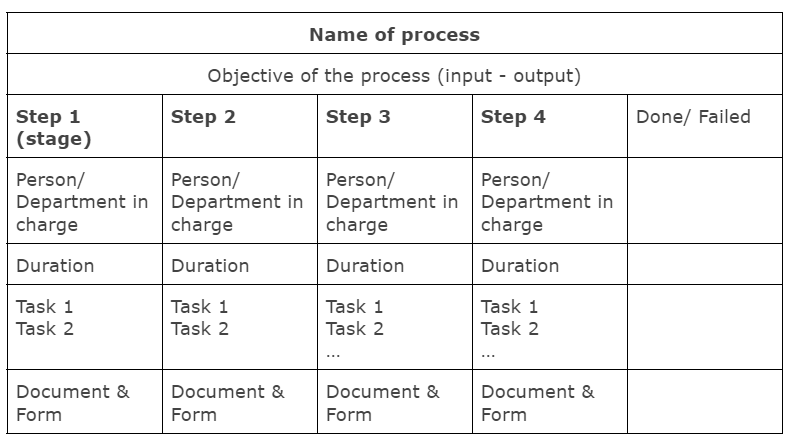
Now, this is the part you’ve been waiting for. To design an efficient process, it is crucial to identify the following components:
Objective: Define the purpose of the process. What specific business problem does this process address?
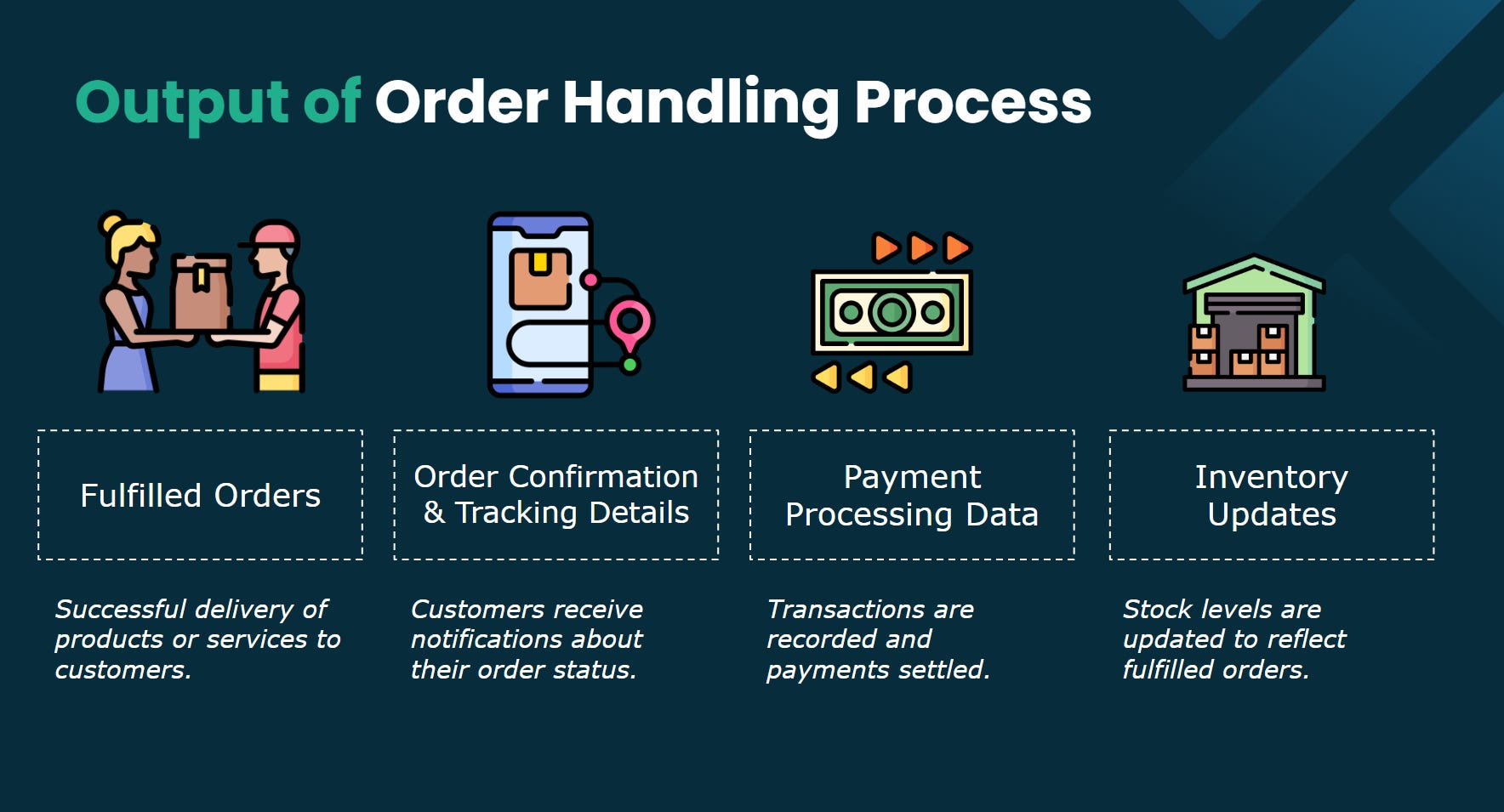
Input and Output: Determine the starting point and required information or objects. Identify when and where the process concludes and what outputs, such as information or products, are generated. For instance, in a sales process, the input is customer interest, and the output is a closed sale. In a recruitment process, the input is interested candidates, and the output is a hired employee.
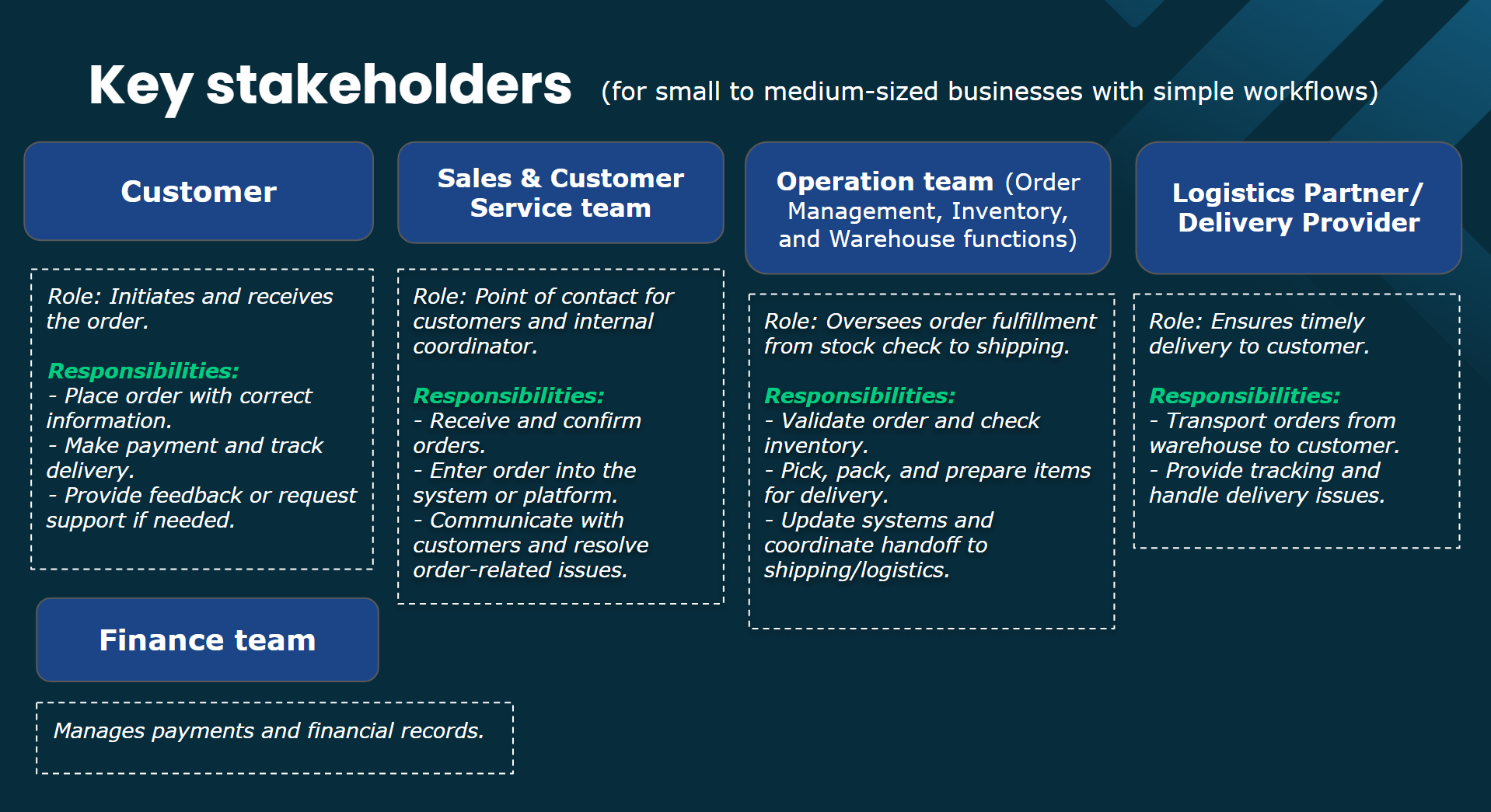
Person in charge: Specify who will apply the process and which individuals or departments will execute tasks at each stage. These PICs are structured to manage access and responsibilities within the workflow, ensuring jobs are handled by the appropriate individuals and stages are completed as planned.
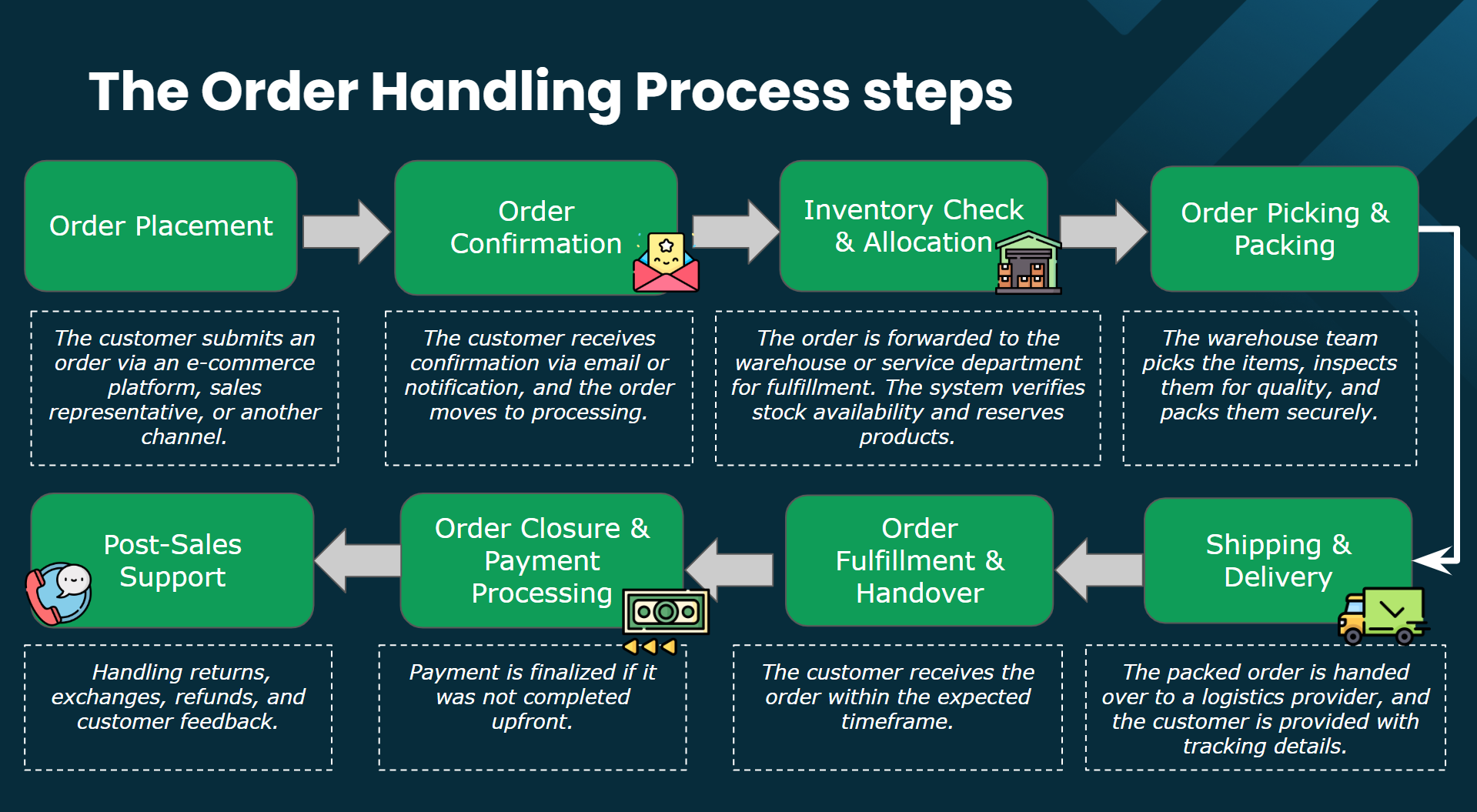
Stage & Tasks: Detail the number of stages in the process and the specific tasks required at each stage, including detailed descriptions. Designing stages and to-dos involves organizing a process into distinct phases (stages) and defining the specific tasks (to-dos) that need to be completed at each stage. This structure helps ensure that processes are executed systematically, with each stage representing a milestone toward the final objective.
Documents and Forms: Identify the necessary information and documentation to complete each process step and the outputs generated upon completion. Let’s transform these documents into custom fields. A custom field is a configurable data input field that allows you to capture specific information at various stages of a process. These fields provide structure to the data collected, ensuring it is relevant, organized, and easily accessible.
Stage Duration is the maximum time allowed for completing a specific stage within a workflow. It sets a time frame for how long a to-do list within that stage should ideally take to complete. By defining a duration for each stage, you create measurable standards for task completion, which helps keep workflows on schedule and identify any delays or bottlenecks.
Upon understanding these elements, you can design a process using a template as follows:
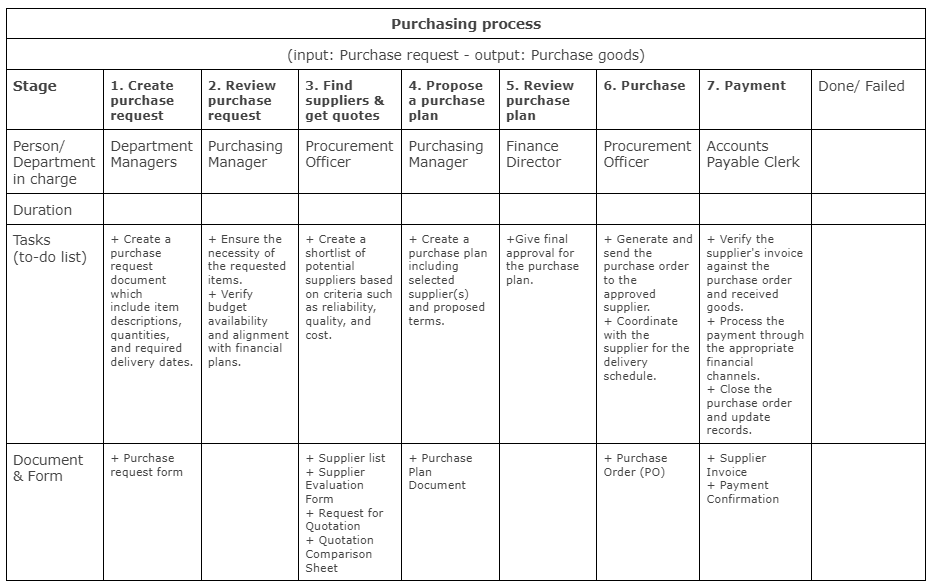
Example: A purchasing process begins with a "purchase request" and proceeds through various steps to conclude with "purchased goods."
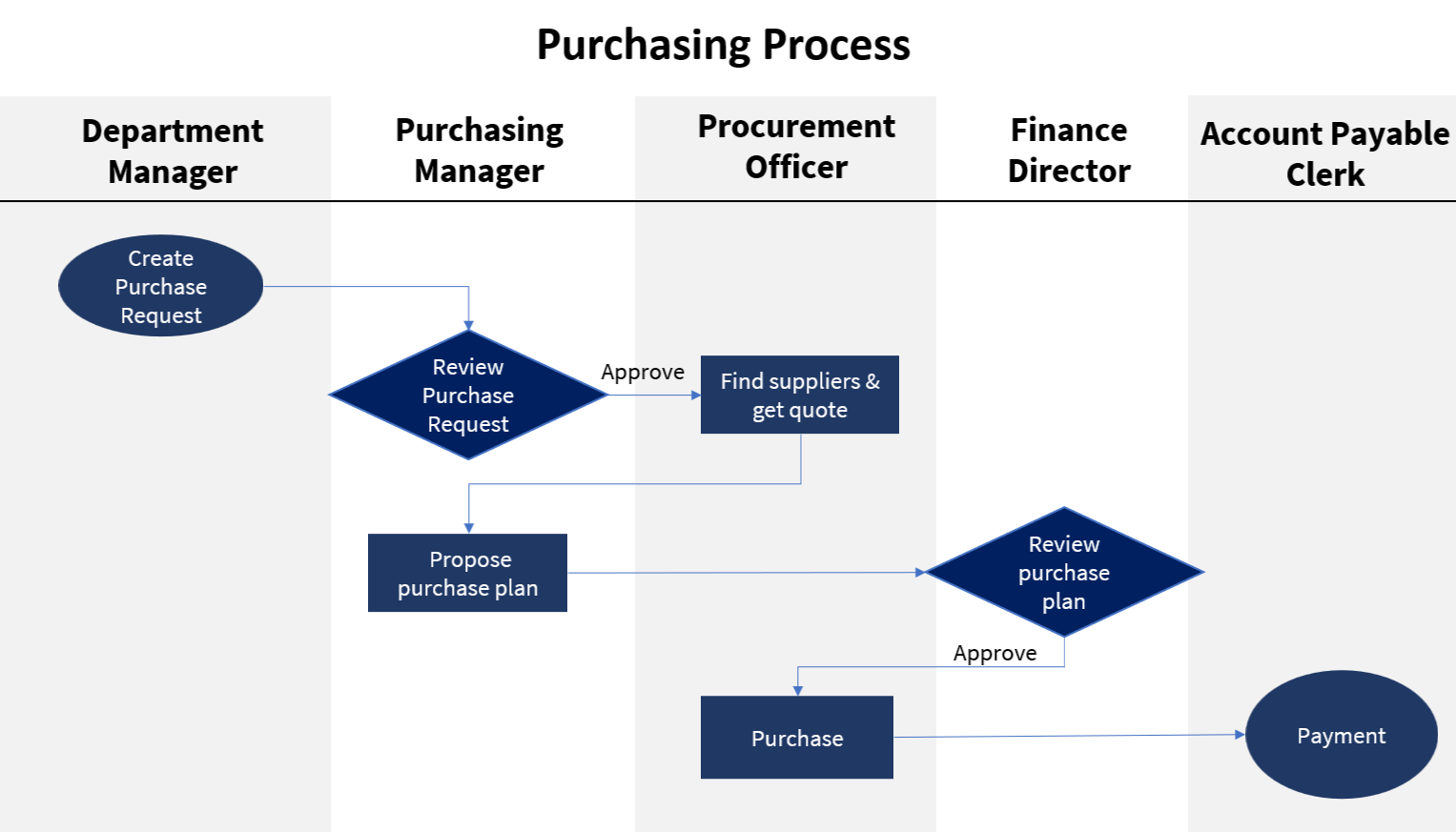
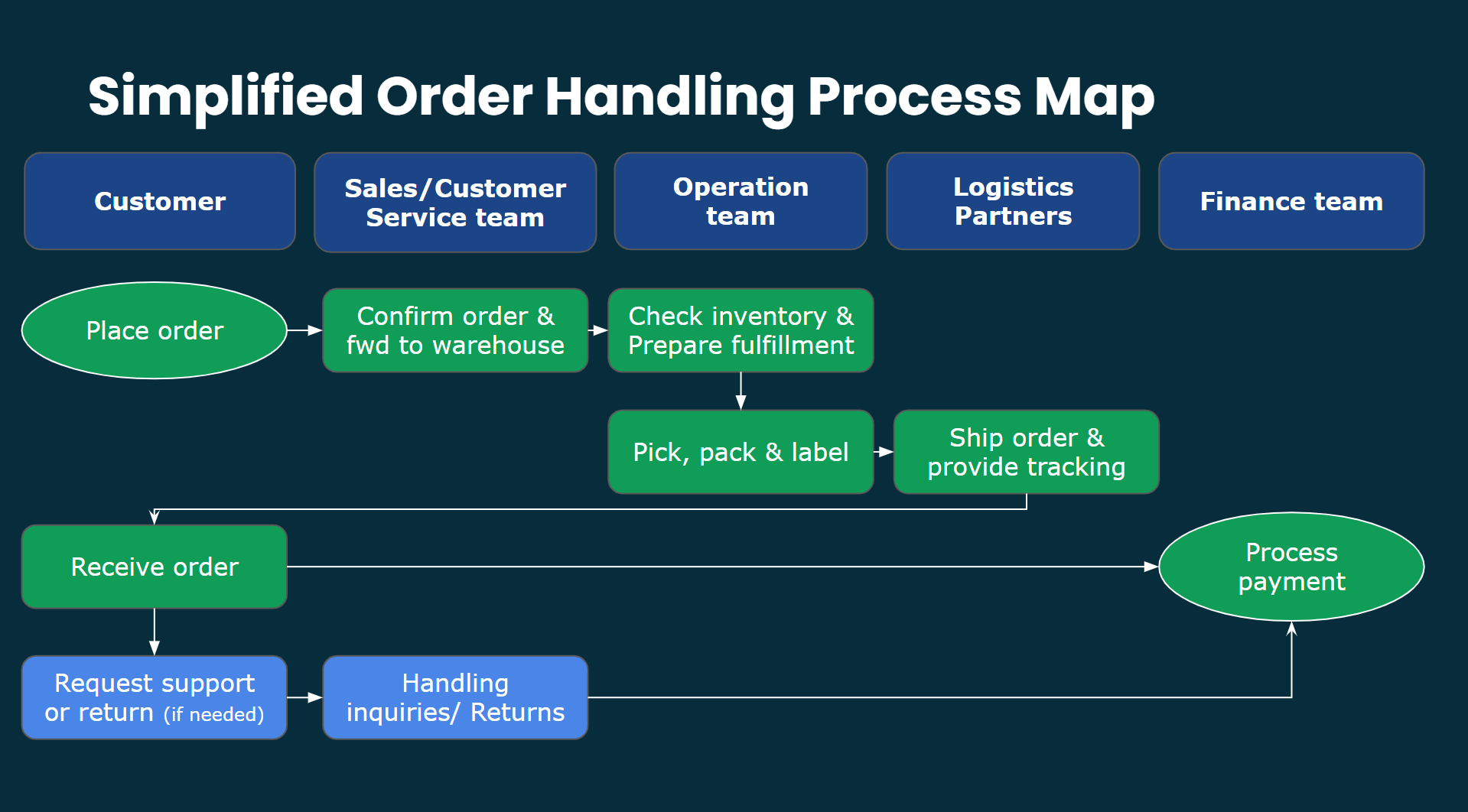
A flowchart can effectively model this process.
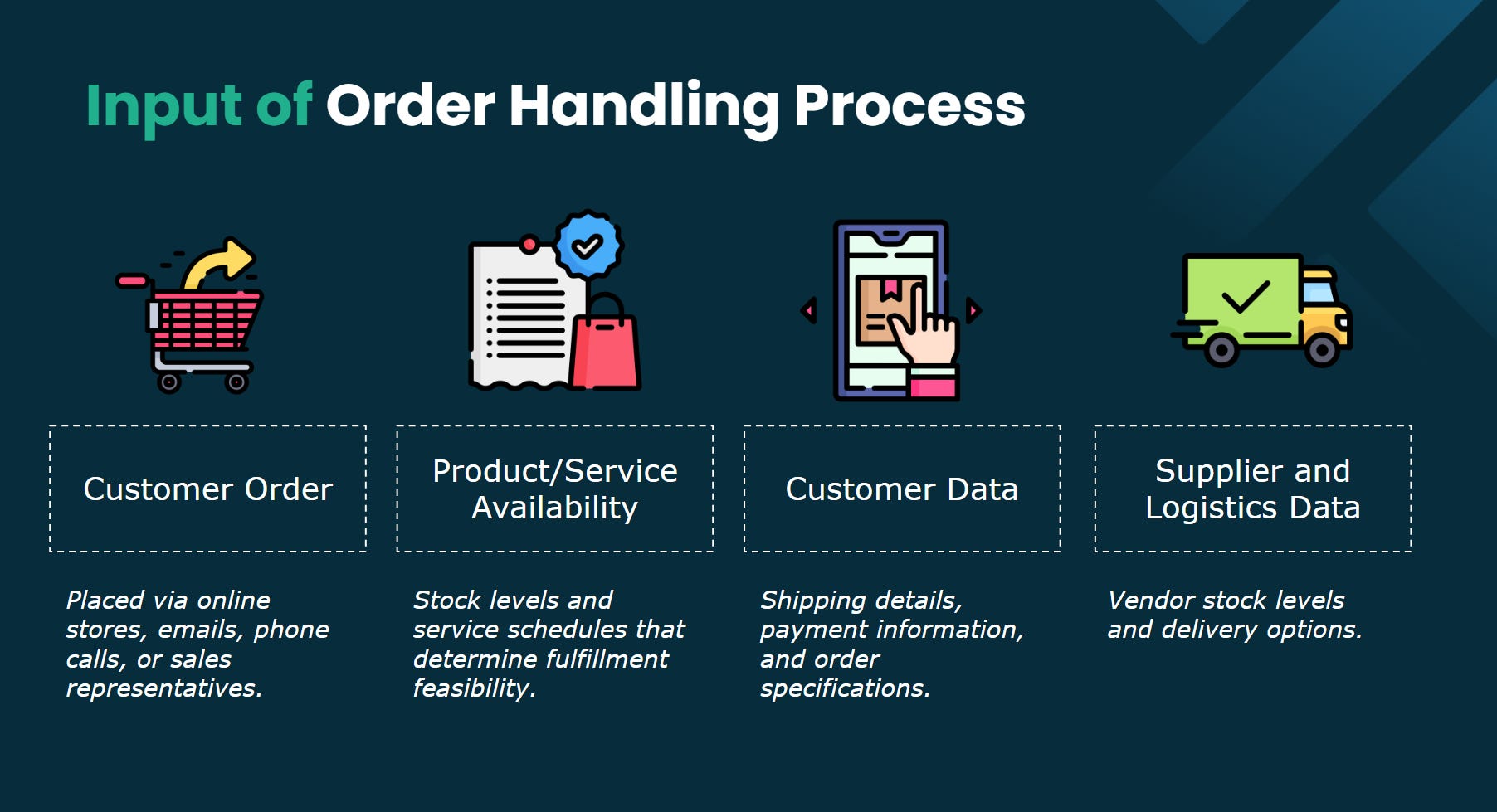
As another example, I’ll walk you through designing an Order Handling Process using the key components mentioned above - Inputs & Outputs, PICs, Stages & To-dos. In a real operation, you'll also need to define stage durations, stage custom fields and assignment methods between stages.
Is everything still going smoothly on your end? Hope it's all good so far.
Now let’s take a look at Rework Flows and see how it can help you standardize your processes with ease.
Steps to Create a New Process in Rework Flow
Follow these steps to design and standardize your processes effectively:
Identify Core Processes
List all repetitive tasks and workflows critical to your business.
Focus on areas where inconsistencies or bottlenecks slow down progress.
Document each process:
Break each process into clear, actionable steps.
Include details such as required inputs, decision points, and expected outcomes (output).
Assign Owners – Ensure accountability and monitoring.
Set Standards
Define the "gold standard" for how each step should be performed.
Create guidelines that ensure quality and consistency across the team.
Map the Workflow in Rework Flow
Use Stages to represent each step in the process.
Assign Roles to clarify ownership at each stage.
Design rules using stage to-dos, custom fields, and assignment methods between stages.
Leverage Rework Flow’s Guides feature to attach instructions to each stage, ensuring guidelines are accessible for on-the-job learning.
Test and Refine
Run the process with a small team or pilot group.
Gather feedback to identify inefficiencies or missing steps.
Iterate until the process flows seamlessly.
Train and Onboard
Introduce the standardized process to your team with a walkthrough in Rework Flow.
Provide training to ensure everyone understands their role.
Monitor and Optimize
Use the Analytics feature in Rework Flow to track performance.
Look for trends, bottlenecks, or areas for improvement.
Regularly update processes as your business evolves.
Scale and Delegate
Once standardized, scale the process across teams or departments.
Delegate with confidence, knowing the system ensures consistency and quality.
By following these steps, you’ll turn scattered workflows into a streamlined system, freeing up your time to focus on scaling your business.
In my next post, I’ll dive into the key processes I’ve designed to help my inbound marketing team run independently. These processes have enabled us to seamlessly manage content marketing for 10+ products across 5 key communication channels while ensuring our in-house marketing team enjoys a healthy work-life balance.

If you’re curious about this tool, you can explore it yourself with a free trial of Rework Flow here.
Standardizing processes isn’t just about creating structure, it’s about gaining clarity and control over your business operations. By designing and implementing clear workflows, you create a foundation that allows you to monitor performance, identify areas for improvement, and drive consistent progress. I hope my experiences inspire you to take the next step in transforming your business.